



NEW YORK, May 24, 2021 /PRNewswire/ —
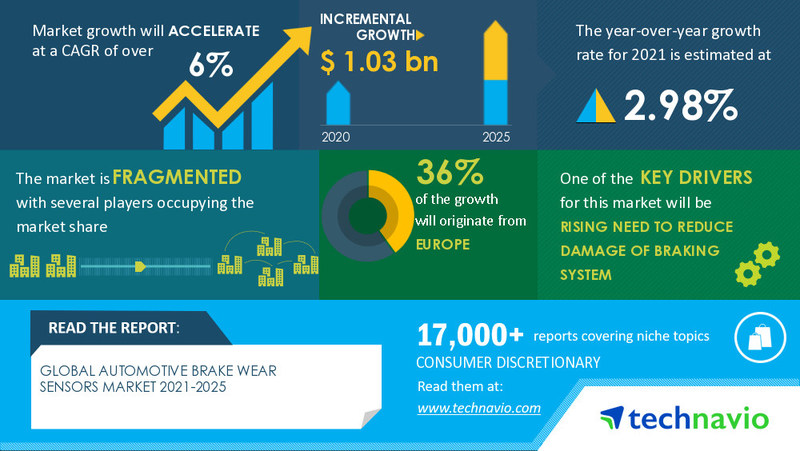
Technavio has been monitoring the automotive brake wear sensors market and it is poised to grow by USD 1.03 billion during 2021-2025, progressing at a CAGR of over 6% during the forecast period. The report offers an up-to-date analysis regarding the current market scenario, latest trends and drivers, and the overall market environment.
Frequently Asked Questions:
- Based on segmentation by application, which is the leading segment in the market?
Passenger cars are the leading segment in the market. - At what rate is the market projected to grow?
The market is projected to accelerate at a CAGR of over 6%. - Who are the top players in the market?
Akebono Brake Industry Co. Ltd., BorgWarner Inc., Brembo Spa, Continental AG, DENSO Corp., General Motors Co., Mitsubishi Electric Corp., Robert Bosch GmbH, Sensata Technologies Holding Plc, and Standard Motor Products Inc. are the top players in the market. - What are the key market drivers and challenges?
The market is driven by the rising need to reduce the damage of the braking system. However, the pressure to reduce cost for OEMs will impede the market growth. - How big is the European market?
36% of the market’s growth will originate from Europe during the forecast period.
Buy 1 Technavio report and get the second for 50% off. Buy 2 Technavio reports and get the third for free.
View market snapshot before purchasing
The market is fragmented, and the degree of fragmentation will accelerate during the forecast period. Akebono Brake Industry Co. Ltd., BorgWarner Inc., Brembo Spa, Continental AG, DENSO Corp., General Motors Co., Mitsubishi Electric Corp., Robert Bosch GmbH, Sensata Technologies Holding Plc, and Standard Motor Products Inc. are some of the major market participants. Although the factors such as the rising need to reduce the damage of the braking system, the increased end-user concern for vehicle security, and the increasing demand for automotive vehicles will offer immense growth opportunities, the pressure to reduce cost for OEMs is likely to pose a challenge for the market vendors. In a bid to help players strengthen their market foothold, this automotive brake wear sensors market forecast report provides a detailed analysis of the leading market vendors. The report also empowers industry honchos with information on the competitive landscape and insights into the different product offerings offered by various companies.
Technavio’s custom research reports offer detailed insights on the impact of COVID-19 at an industry level, a regional level, and subsequent supply chain operations. This customized report will also help clients keep up with new product launches in direct & indirect COVID-19 related markets, upcoming vaccines and pipeline analysis, and significant developments in vendor operations and government regulations.
Automotive Brake Wear Sensors Market 2021-2025: Segmentation
Automotive Brake Wear Sensors Market is segmented as below:
- Application
- Passenger Cars
- Commercial Vehicles
- Geography
- North America
- Europe
- APAC
- South America
- The Middle East and Africa
To learn more about the global trends impacting the future of market research, download a free sample: https://www.technavio.com/talk-to-us?report=IRTNTR41285
Automotive Brake Wear Sensors Market 2021-2025: Scope
Technavio presents a detailed picture of the market by the way of study, synthesis, and summation of data from multiple sources. The automotive brake wear sensors market report covers the following areas:
- Automotive Brake Wear Sensors Market Size
- Automotive Brake Wear Sensors Market Trends
- Automotive Brake Wear Sensors Market Industry Analysis
This study identifies the increasing demand for automotive vehicles as one of the prime reasons driving the Automotive Brake Wear Sensors Market growth during the next few years.
Automotive Brake Wear Sensors Market 2021-2025: Key Highlights
- CAGR of the market during the forecast period 2021-2025
- Detailed information on factors that will assist automotive brake wear sensors market growth during the next five years
- Estimation of the automotive brake wear sensors market size and its contribution to the parent market
- Predictions on upcoming trends and changes in consumer behavior
- The growth of the automotive brake wear sensors market across North America, Europe, APAC, South America, and MEA
- Analysis of the market’s competitive landscape and detailed information on vendors
- Comprehensive details of factors that will challenge the growth of automotive brake wear sensors market vendors
Related Reports on Consumer Discretionary Include:
Global Automotive Air Brake System Market– The automotive air brake system market is segmented by application (trucks and buses) and geography (APAC, North America, Europe, South America, and MEA).
Download FREE Sample Report
Global Automotive Brake Components Aftermarket– The automotive brake components aftermarket market is segmented by product (brake pads, brake shoes, brake calipers, brake rotors, brake drums, and brake hoses), geography (APAC, Europe, North America, MEA, and South America), and vehicle type (passenger cars and commercial vehicles).
Download FREE Sample Report
Table of Contents:
Executive Summary
Market Landscape
- Market ecosystem
- Market characteristics
- Value chain analysis
Market Sizing
- Market definition
- Market segment analysis
- Market size 2020
- Market outlook: Forecast for 2020 – 2025
Five Forces Analysis
- Five forces summary
- Bargaining power of buyers
- Bargaining power of suppliers
- Threat of new entrants
- Threat of substitutes
- Threat of rivalry
- Market condition
Market Segmentation by Application
- Market segments
- Comparison by Application
- Passenger cars – Market size and forecast 2020-2025
- Commercial vehicles – Market size and forecast 2020-2025
- Market opportunity by Application
Customer Landscape
Geographic Landscape
- Geographic segmentation
- Geographic comparison
- North America – Market size and forecast 2020-2025
- Europe – Market size and forecast 2020-2025
- APAC – Market size and forecast 2020-2025
- South America – Market size and forecast 2020-2025
- MEA – Market size and forecast 2020-2025
- Key leading countries
- Market opportunity by geography
- Market drivers
- Market challenges
- Market trends
Vendor Landscape
- Overview
- Vendor landscape
- Landscape disruption
Vendor Analysis
- Vendors covered
- Market positioning of vendors
- Akebono Brake Industry Co. Ltd.
- BorgWarner Inc.
- Brembo Spa
- Continental AG
- DENSO Corp.
- General Motors Co.
- Mitsubishi Electric Corp.
- Robert Bosch GmbH
- Sensata Technologies Holding Plc
- Standard Motor Products Inc.
Appendix
- Scope of the report
- Currency conversion rates for US$
- Research methodology
- List of abbreviations
About Us
Technavio is a leading global technology research and advisory company. Their research and analysis focuses on emerging market trends and provides actionable insights to help businesses identify market opportunities and develop effective strategies to optimize their market positions. With over 500 specialized analysts, Technavio’s report library consists of more than 17,000 reports and counting, covering 800 technologies, spanning across 50 countries. Their client base consists of enterprises of all sizes, including more than 100 Fortune 500 companies. This growing client base relies on Technavio’s comprehensive coverage, extensive research, and actionable market insights to identify opportunities in existing and potential markets and assess their competitive positions within changing market scenarios.
Contact
Technavio Research
Jesse Maida
Media & Marketing Executive
US: +1 844 364 1100
UK: +44 203 893 3200
Email: [email protected]
Website: www.technavio.com/
Report Page: https://www.technavio.com/report/automotive-brake-wear-sensors-market-industry-analysis
SOURCE Technavio

